CLICK ME
CLICK ME
Design an in-flight error notification system for pilots
DISCLAIMER: The following case study references a classified system for U.S. government clients. Specifics have been removed in compliance with non-disclosure agreements; additional information is available upon verbal request.
OVERVIEW
THE PROBLEM:
Craft a diagnostic notification experience for an in-flight navigation application that:
Accurately reflects real-time system performance
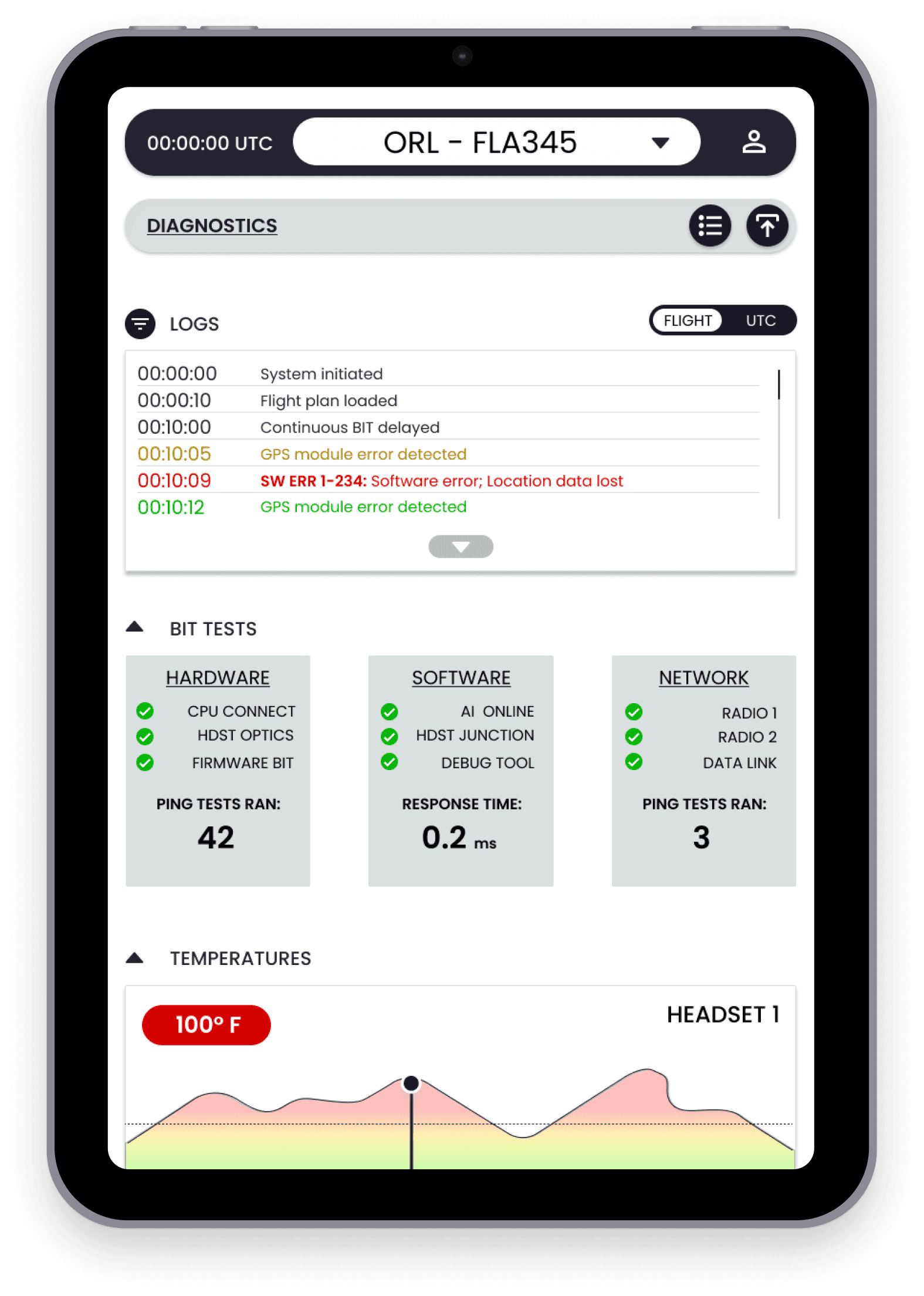
Allows for component-level troubleshooting
Provides actionable recommendations that allow for fast resolutions
MY ROLE:
LEAD UX DESIGNER
THE TEAM:
2 DESIGNERS, 2 ENGINEERS, 2 PRODUCT MANAGERS
THE TOOLS:
FIGMA, REACT, PROTOPIE, IPAD MINI
CHALLENGES:
DATA TRANSFER
Security guideline adherence
Resource constraints
Data must be transferred from other platforms
Usable understand intense physical strain (G-Force)
Must provide rapid executable recommendations
GOALS
An interface that is intuitive for both internal users and external clients
1
Diagnostic interface that visually indicates system health
2
Rapid troubleshooting ability for users of all skill levels
3
ACTION PLAN
RESEARCH & DISCOVERY
USER INTERVIEWS
BUILDING VISION BOARDS
USER STORIES & DELEGATION
AFFINITY MAP
EISENHOWER MATRIX
ASSUMPTIONS*
*based on SME interviews and desk research
Screen interaction should be minimal unless absolutely needed
1
Our first version of this system will focus on a general rule set targeting pilots
2
Future iterations may require SD card data management and data export
3
REQUIREMENTS
Provide accurate troubleshooting recommendations
The solution must be scalable to include future features
Quickly diagnose and resolve problems in under 2 minutes
Allow for a full system reset in under 1 minute
Provide logs and error codes
Visually indicate the health of components
Separate software and hardware elements
Avoid information overload while providing executable insights
Avoid increasing mission complexity or training time
Provide experience for less tech-literate users
MUST:
NICE TO HAVES:
USER FLOWS

Identifying & Diagnosing Problems:
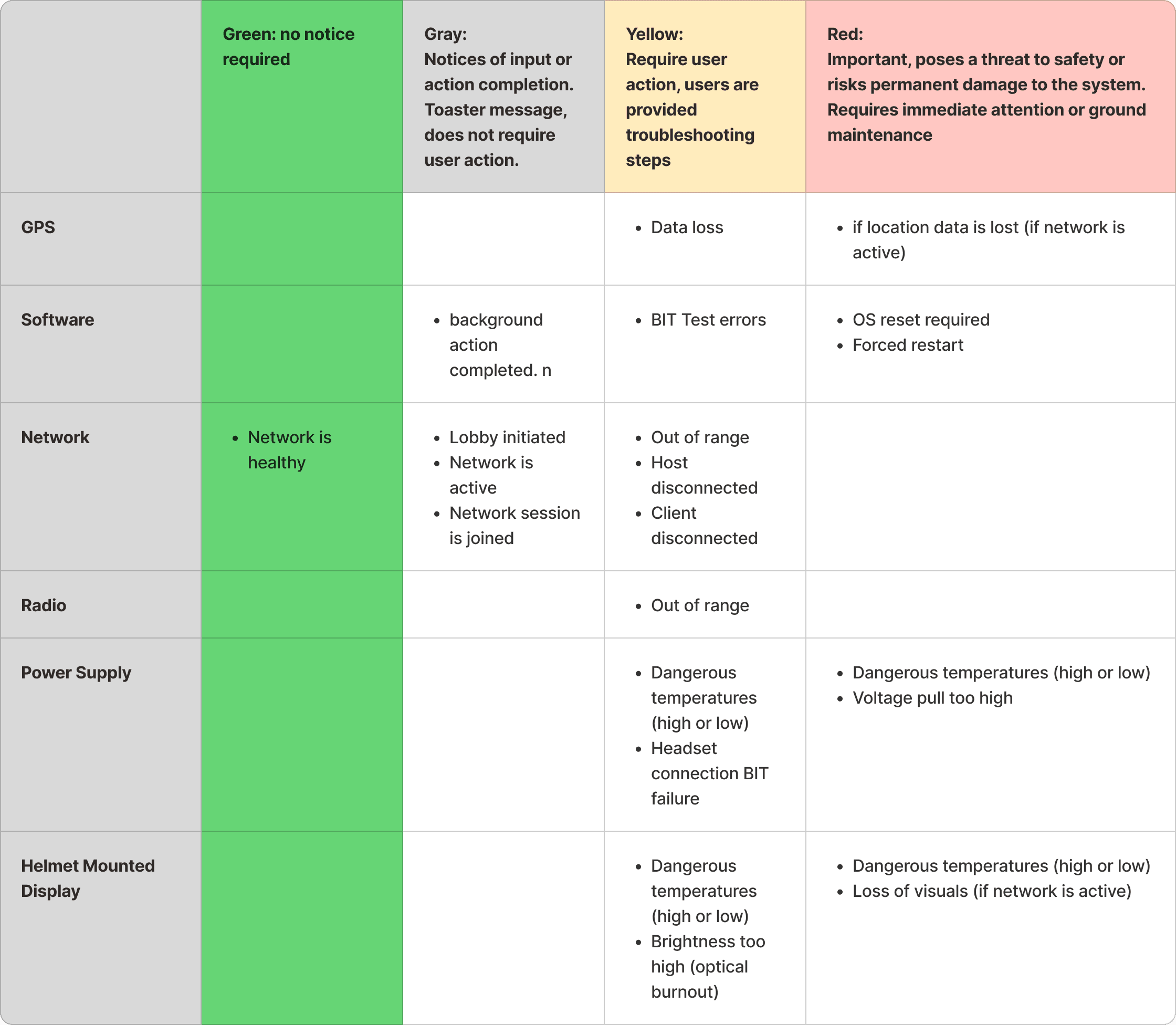
ERROR MATRIX
To better understand the technical limitations, we collaborated with the hardware, software, and firmware team to understand what system messages were being sent to the front-end.
We drafted an error matrix to establish a general rule set to dictate alert severity and alert location within each screen.
5 Subject Matter Expert Interviews:
2 Pilots
3 Engineers
PROCESS:

WIREFRAMES
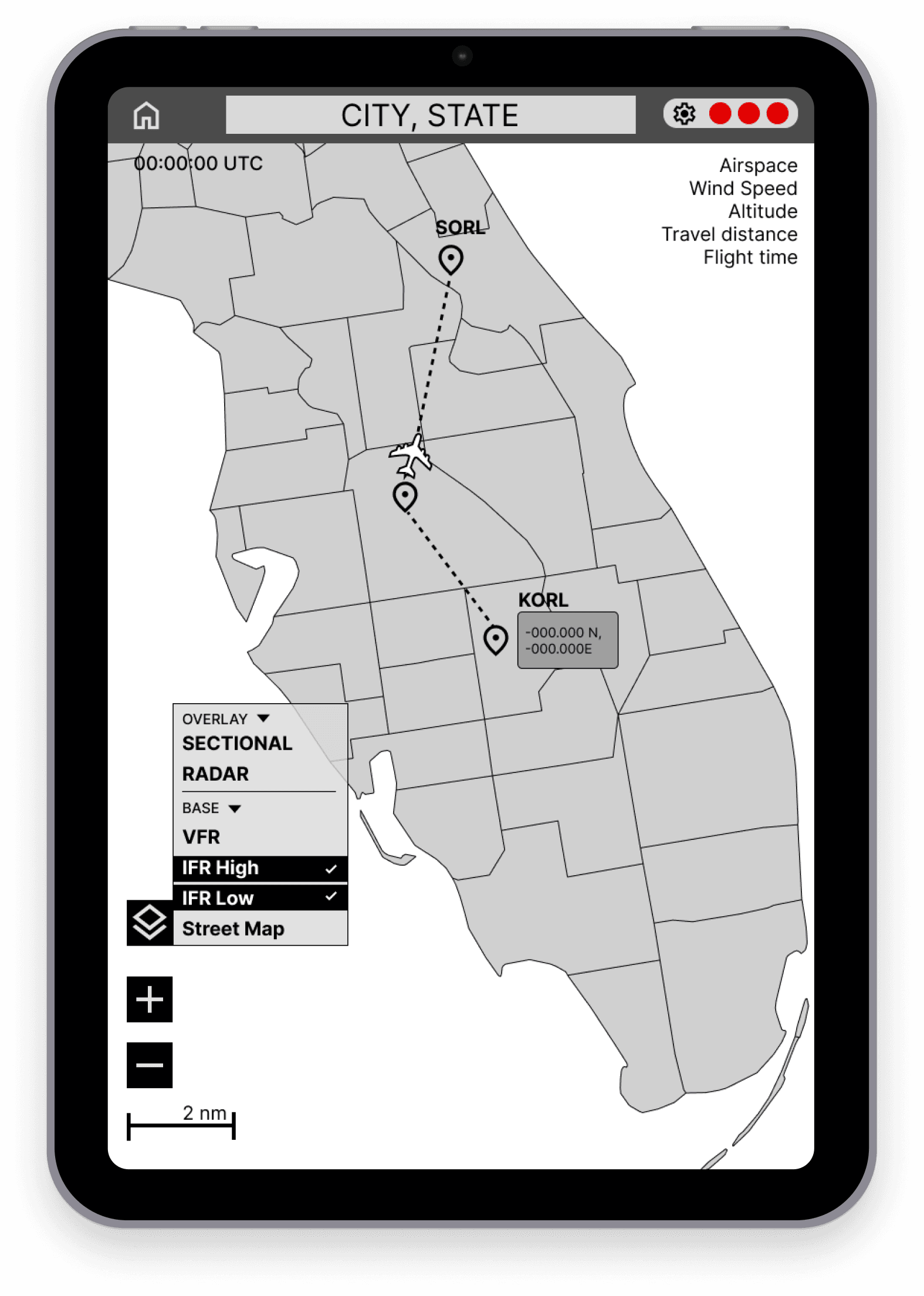
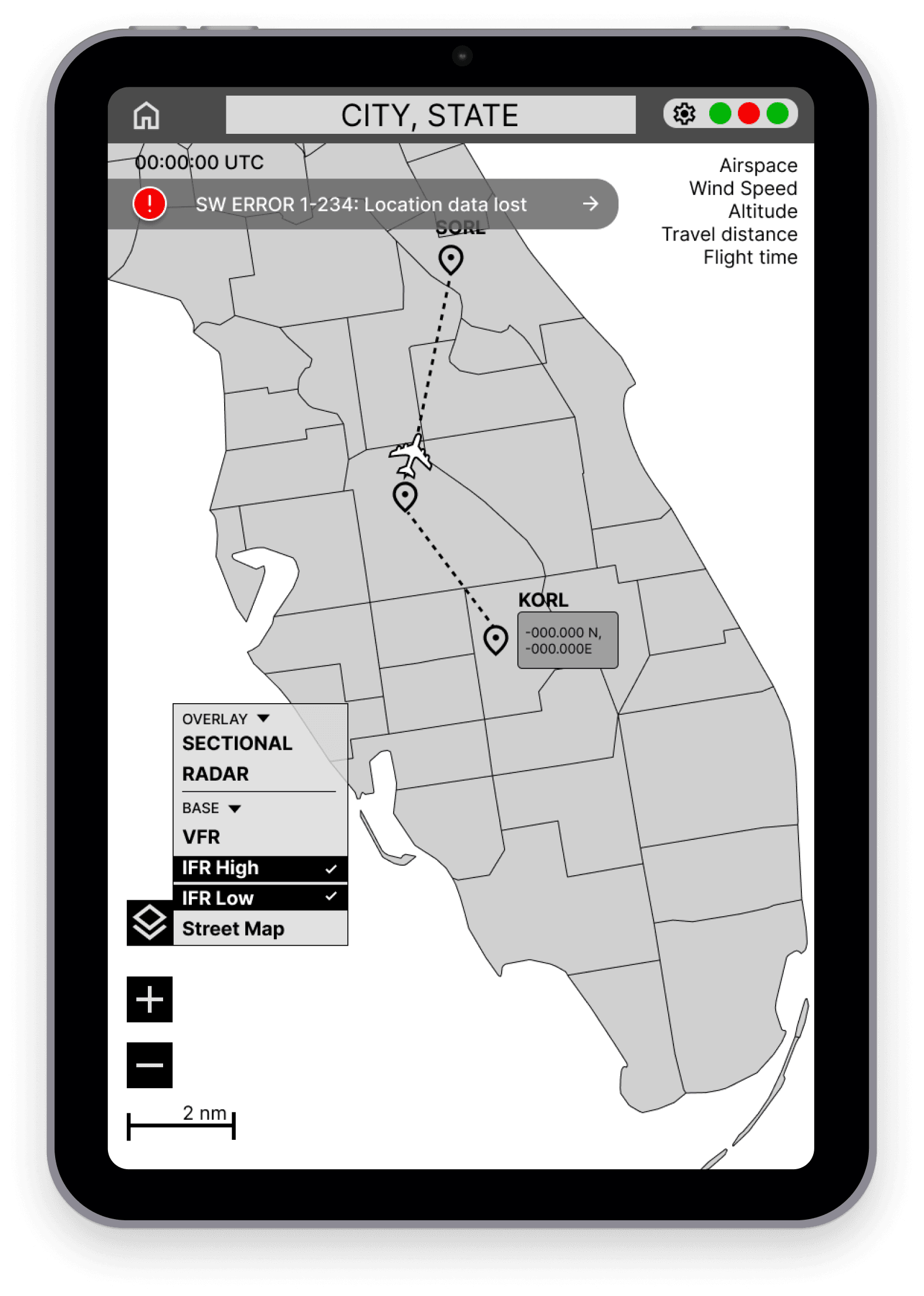
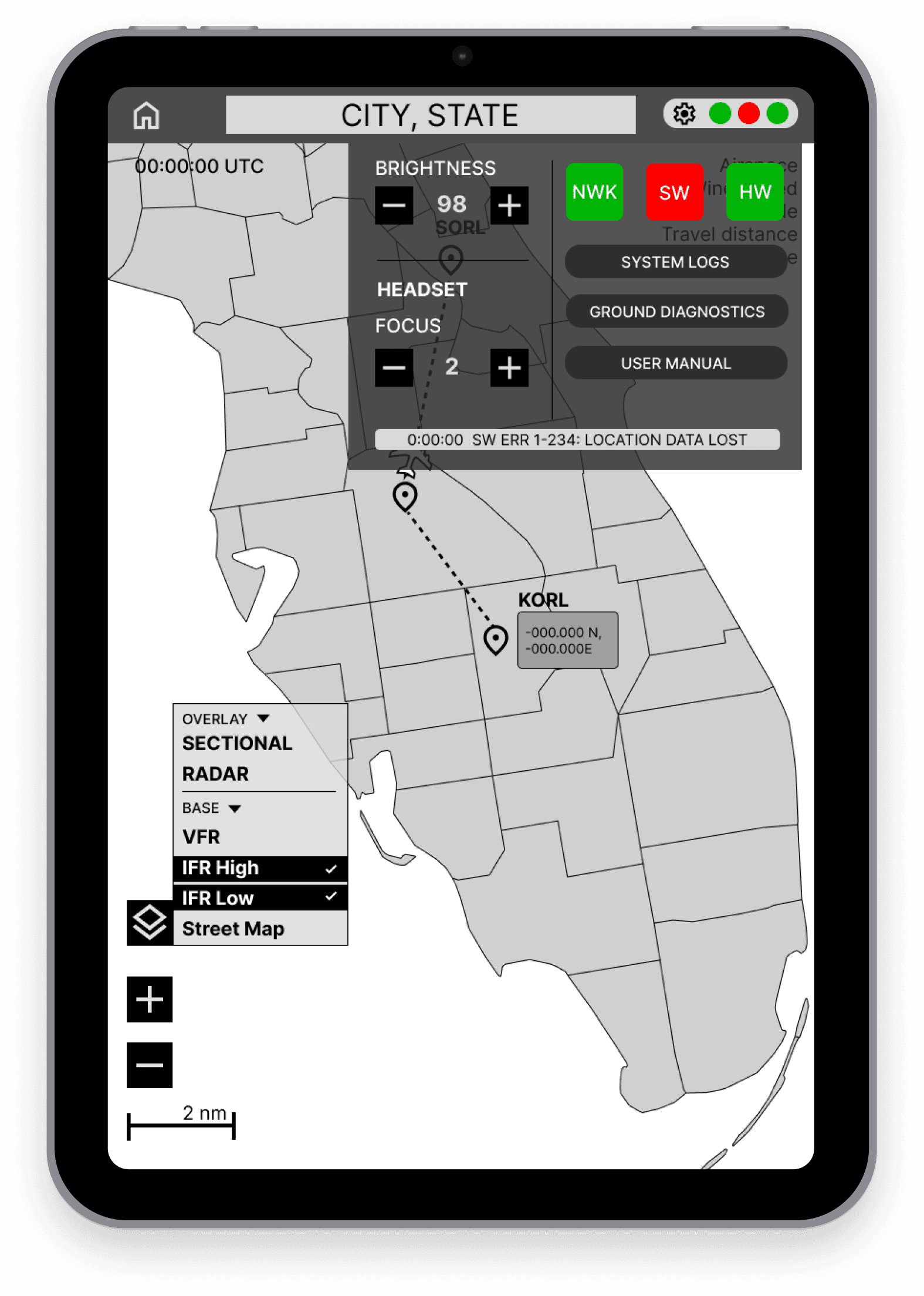
Reference and inspiration were taken from the Apple Human Interface Guidelines and the standard iOS control panel. To avoid clutter while allowing for quick access and scaling, Apple implements a flexible controls system that varies what information is present based on the page context and the input of the user. Attention was also given to the Garmin Pilot systems, and their web experiences. Garmin interfaces are common in most modern aircraft.
REVIEW & VALIDATE
All tasks were completed within 6 minutes of the test time.
Users would like additional visual indicators of successful network connection before or at startup.
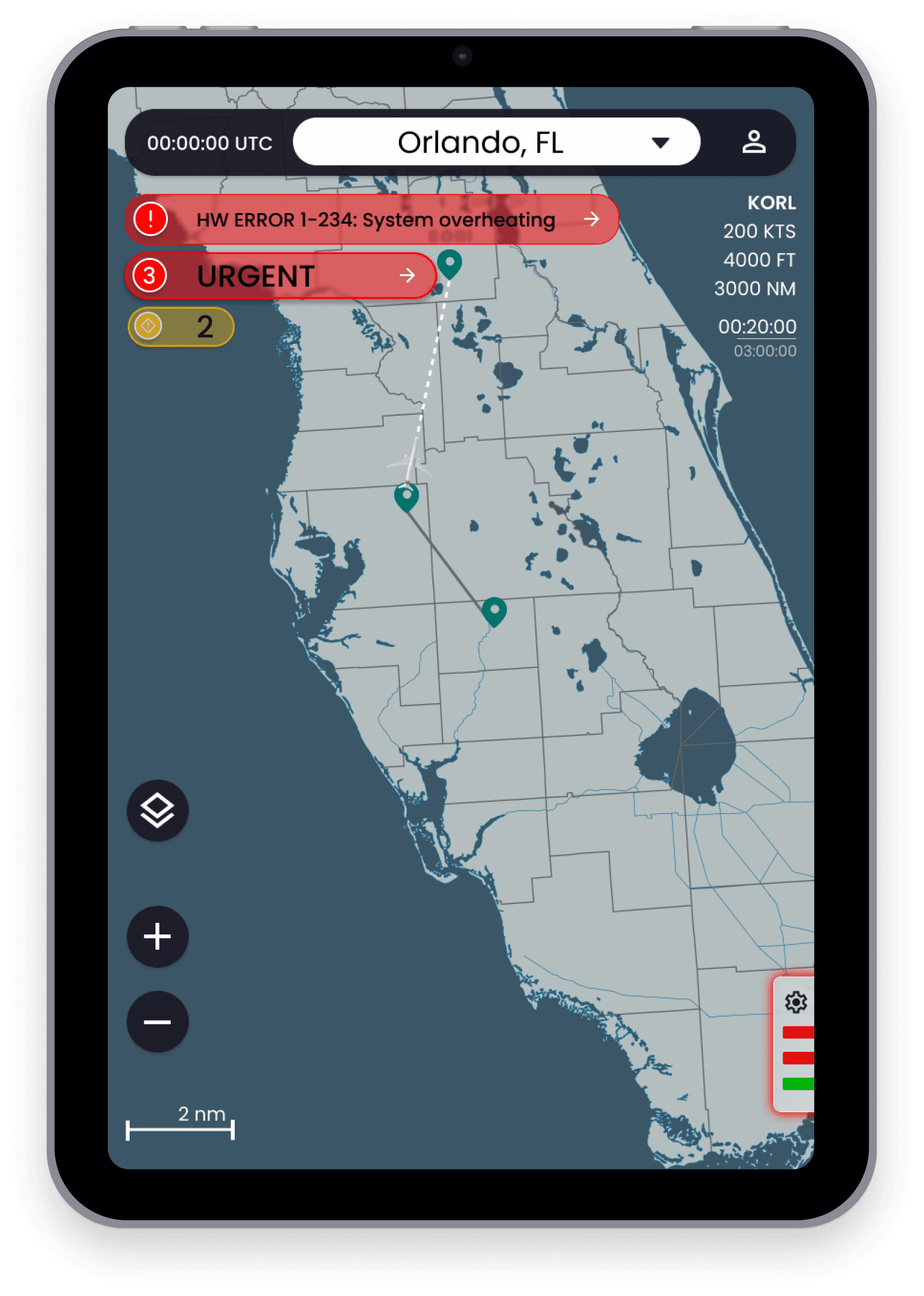
Avoid covering the map and flight data to prioritize safety during flight.
Audience may include back-seat pilots and technicians who desire a deeper technical understanding. But Front-seat pilots are a priority.
All tasks were completed within 6 minutes of the test time.
Users would like additional visual indicators of successful network connection before or at startup.
Avoid covering the map and flight data to prioritize safety during flight.
Audience may include back-seat pilots and technicians who desire a deeper technical understanding. But Front-seat pilots are a priority.
KEY TAKEAWAYS:
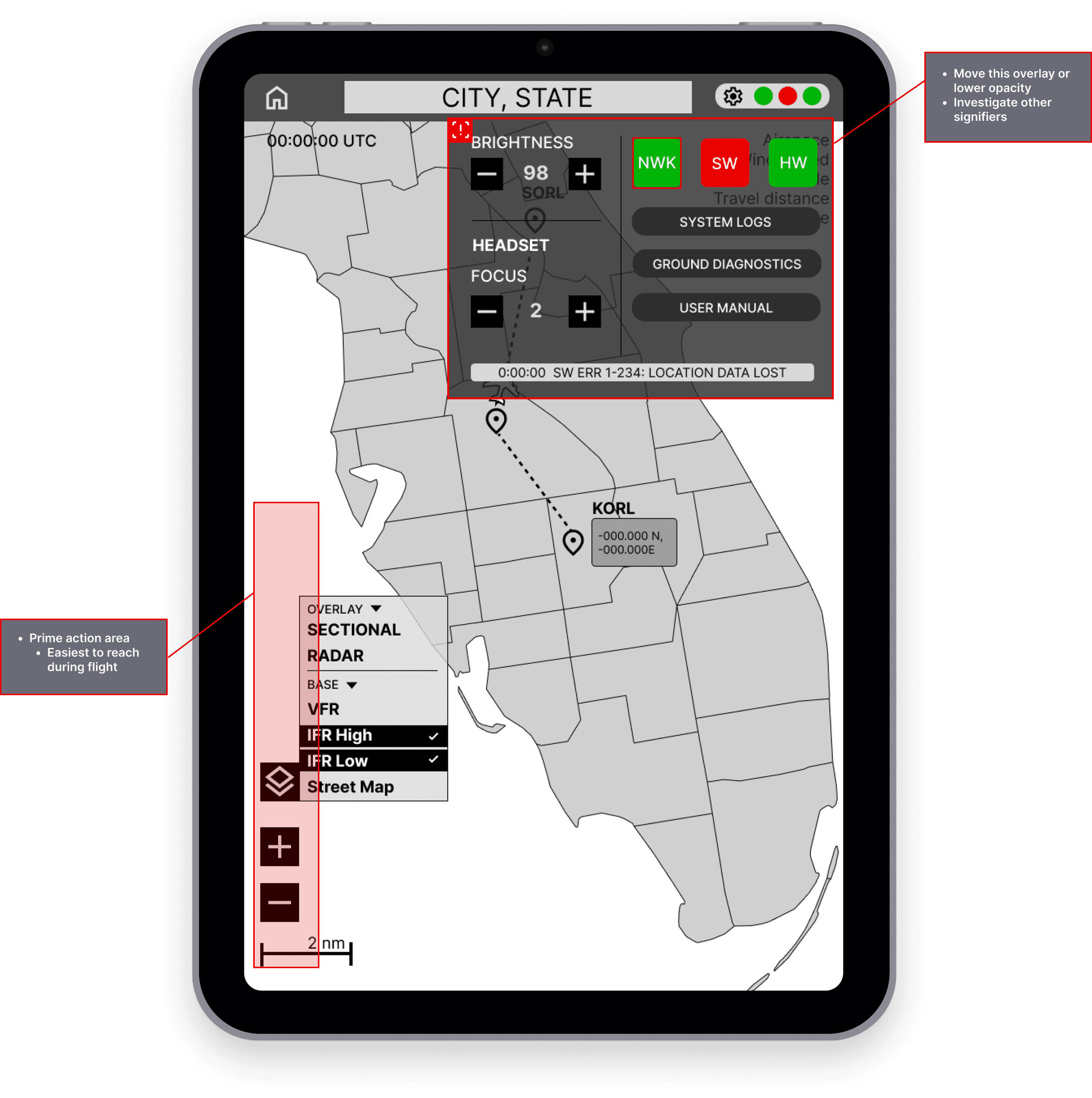
Users were given the application for 30 minutes in a moderated testing session.
After 10 minutes of exploration, users were asked to complete the following tasks:
Identify which system is failing
Identify a warning notice
Open the troubleshooting options
Users were given the application for 30 minutes in a moderated testing session.
After 10 minutes of exploration, users were asked to complete the following tasks:
Identify which system is failing
Identify a warning notice
Open the troubleshooting options
PROCESS:
RESULTS
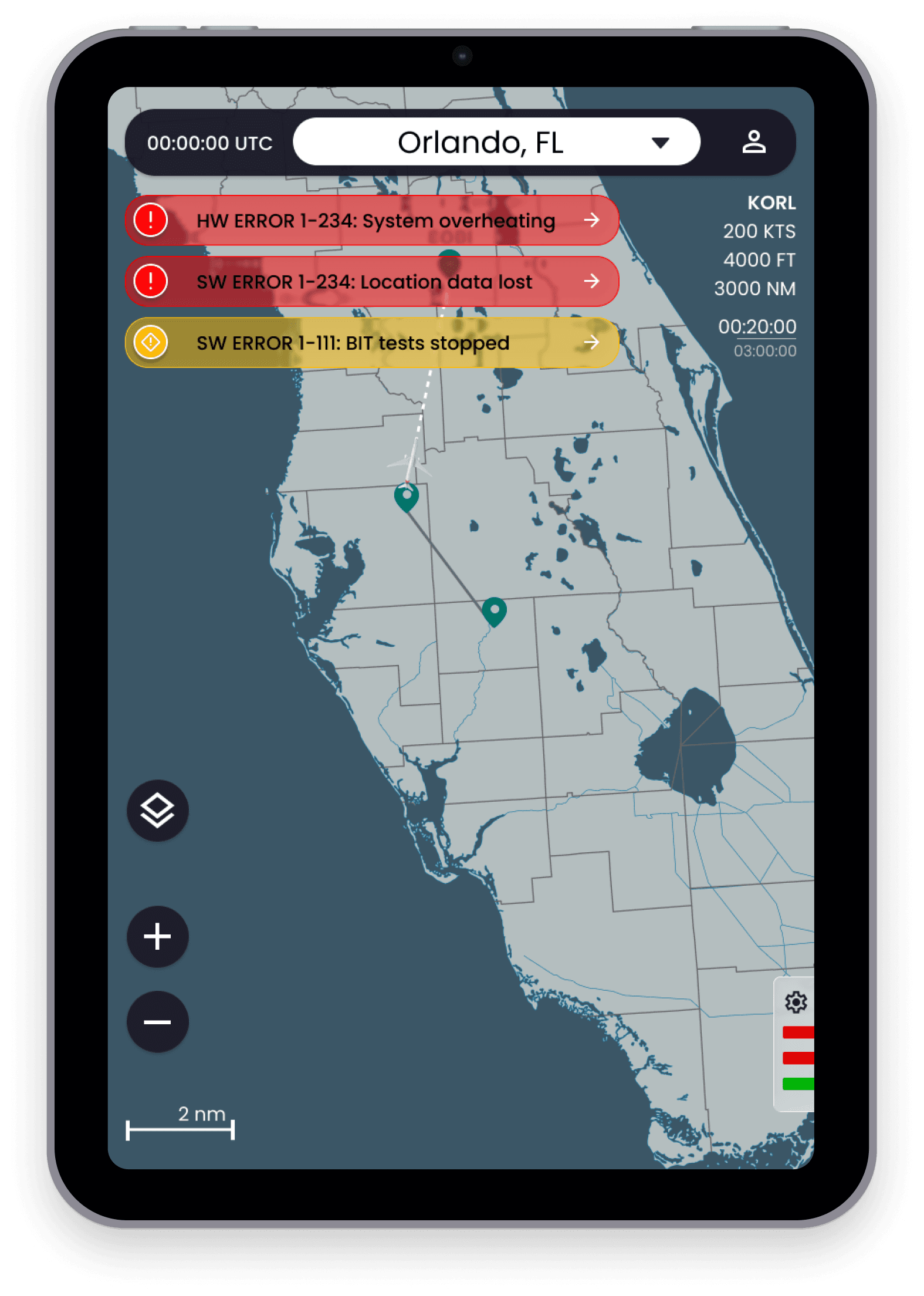
NOTIFICATION STACKING:
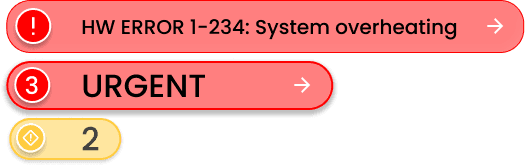
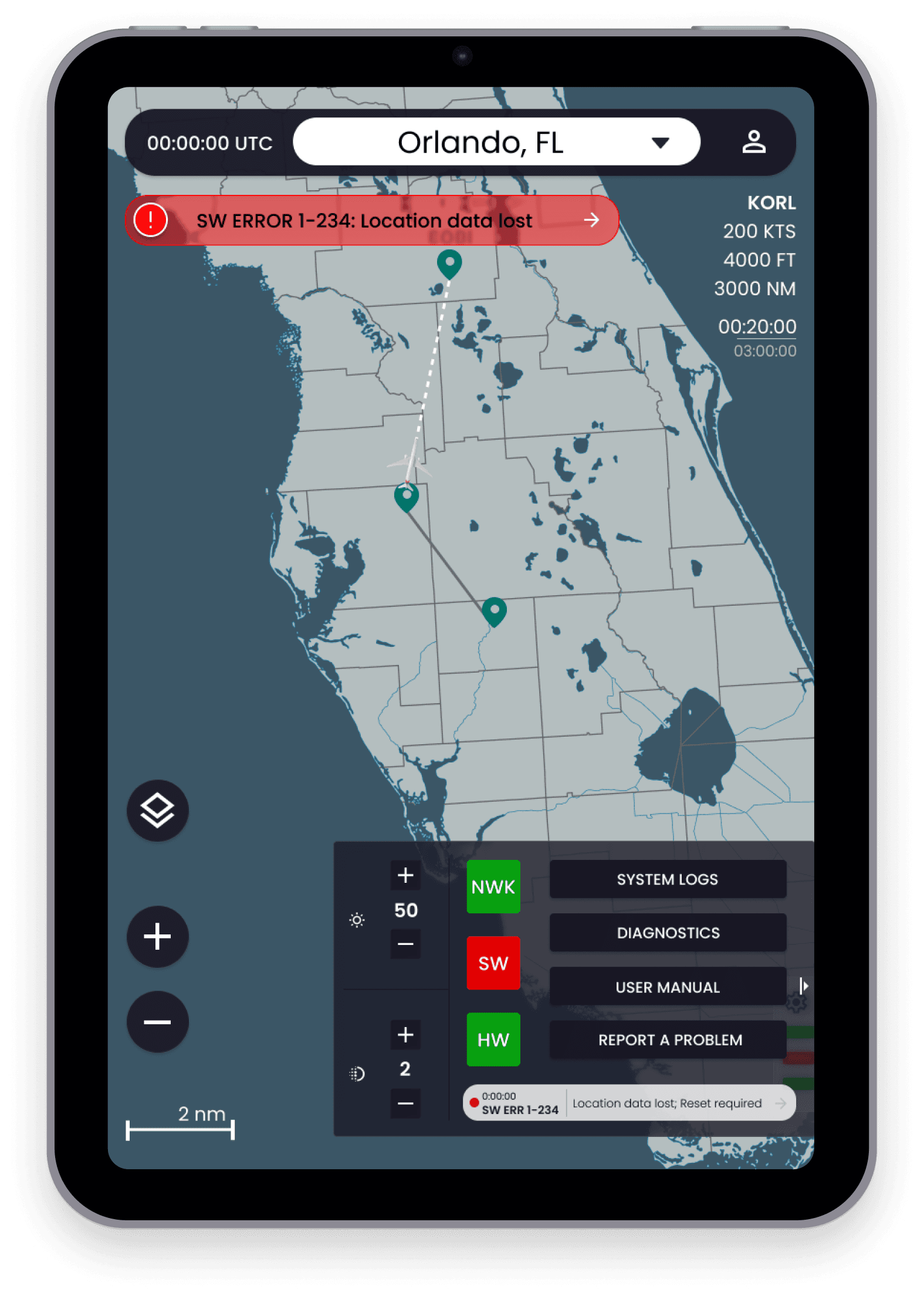
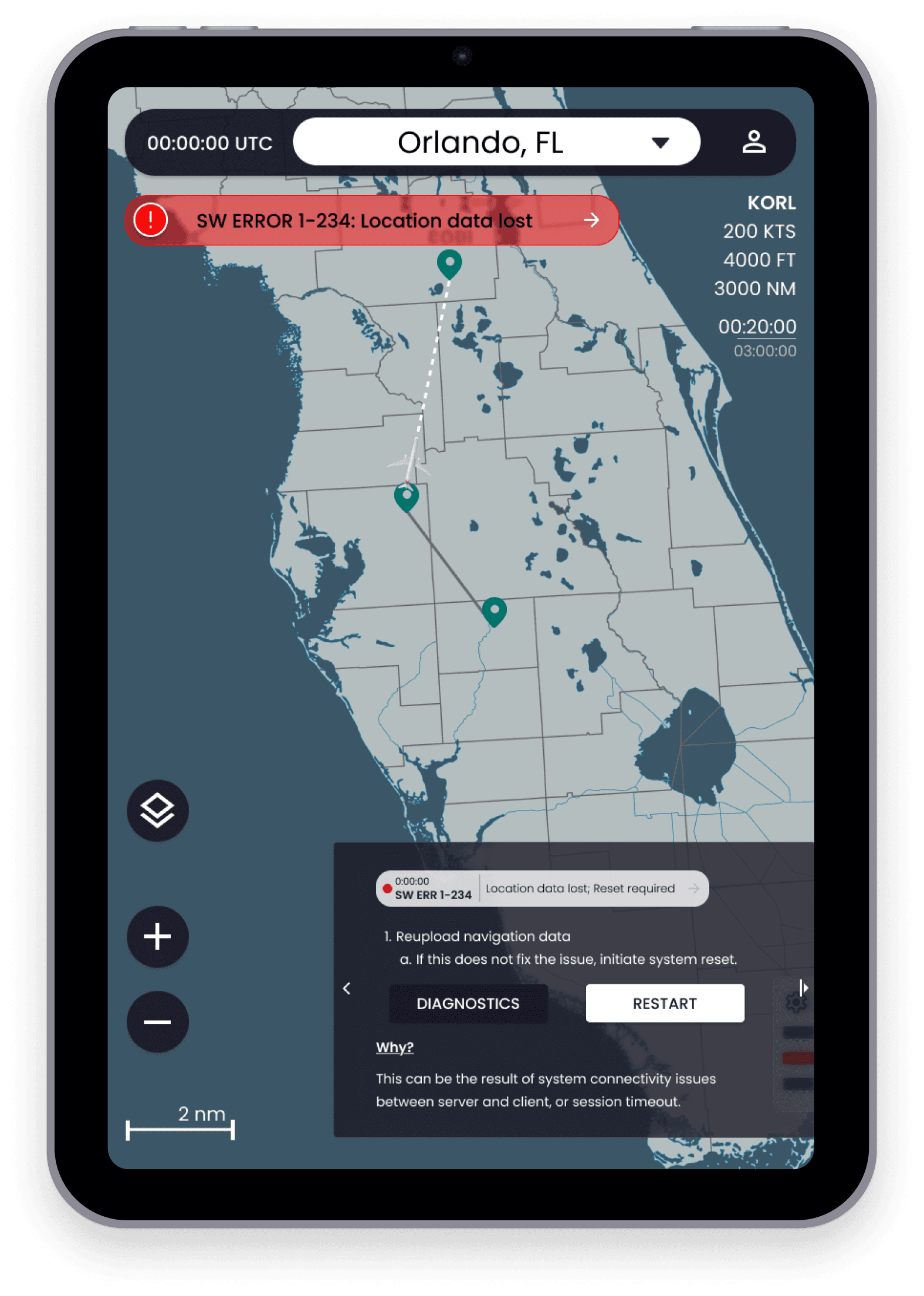
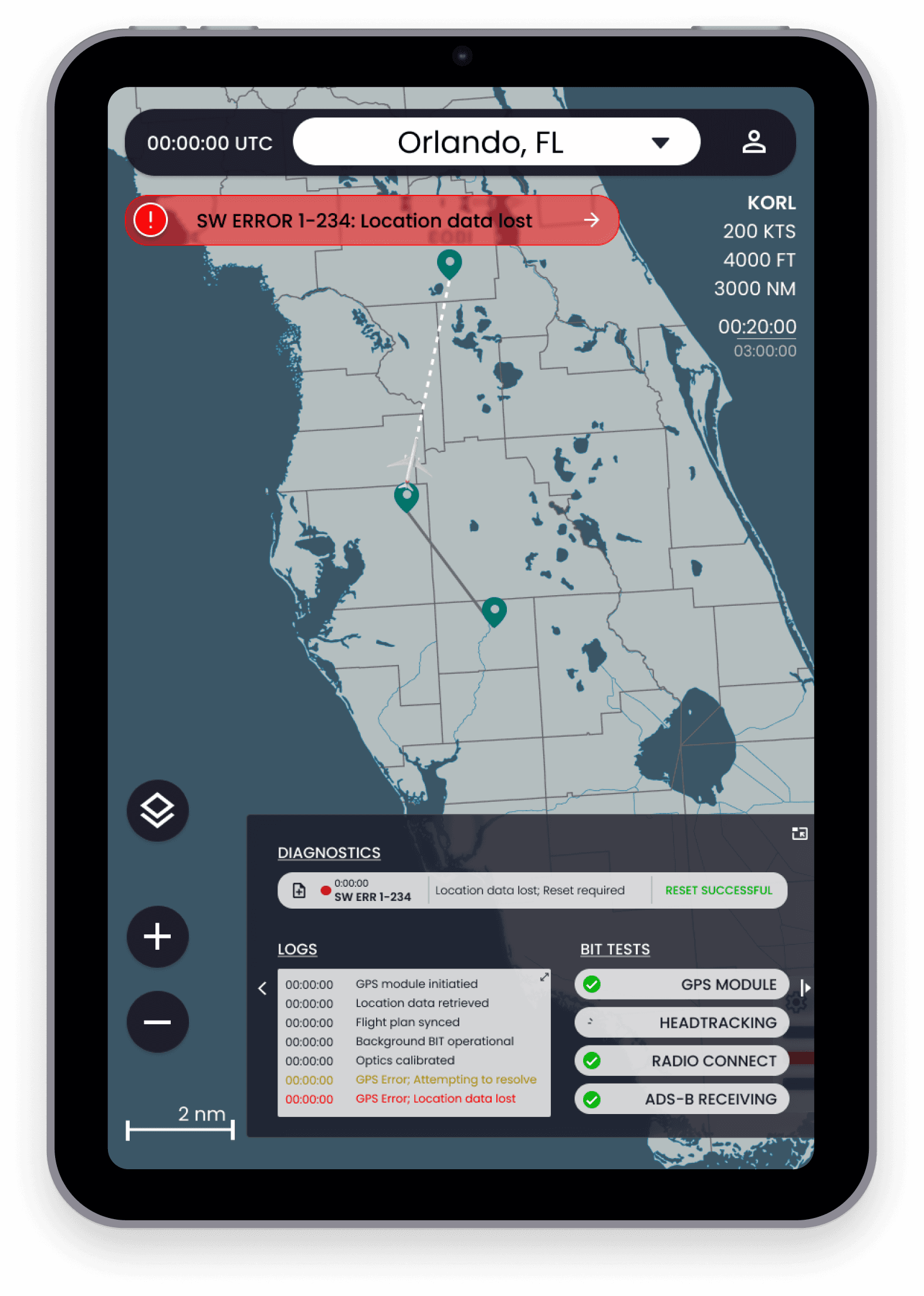
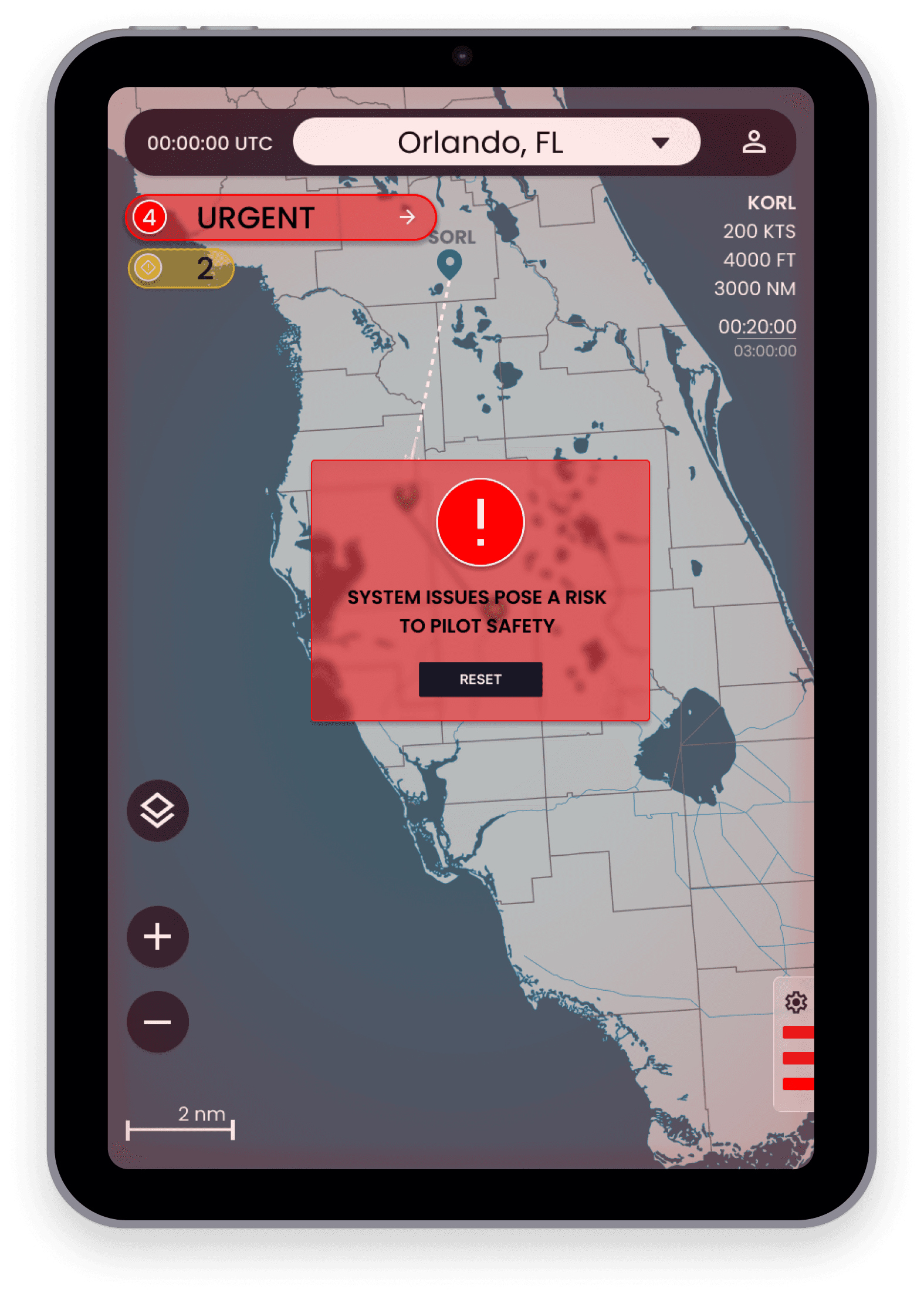
When multiple errors occur, but are left unaddressed, They are converted to buttons.
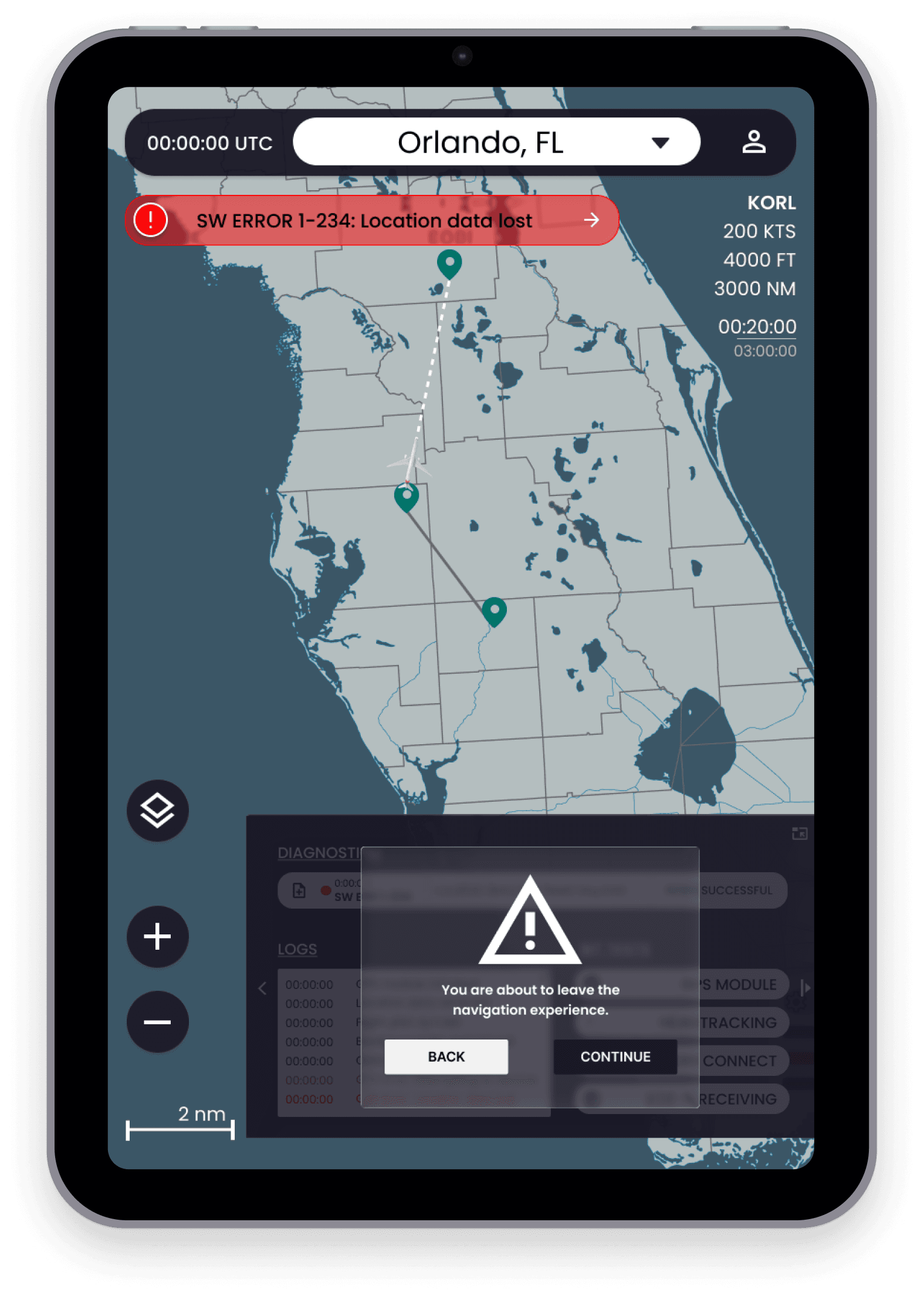
More than 3 urgent level errors are considered a safety of flight risk, and users are transitioned to a captive portal until the concern is addressed.
VISUAL INDICATORS:
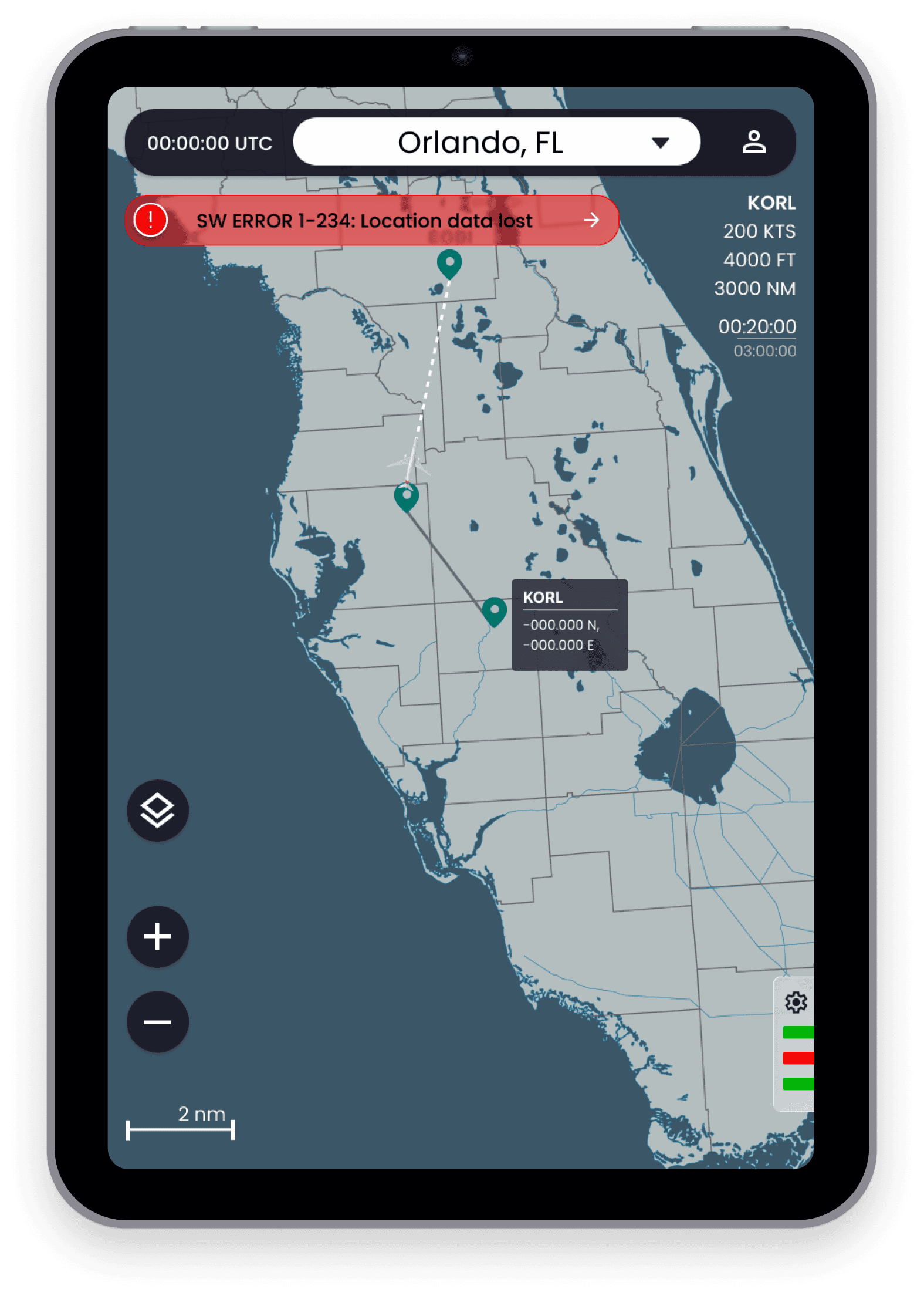
A challenge we faced was when to trigger a captive state, as pilots rely on situational awareness and rapid response to complete their duties.
CLICK ME
Design an in-flight error notification system for pilots
DISCLAIMER: The following case study references a classified system for U.S. government clients. Specifics have been removed in compliance with non-disclosure agreements; additional information is available upon verbal request.
OVERVIEW
THE PROBLEM:
Craft a diagnostic notification experience for an in-flight navigation application that:
Accurately reflects real-time system performance
Allows for component-level troubleshooting
Provides actionable recommendations that allow for fast resolutions
MY ROLE:
LEAD UX DESIGNER
THE TEAM:
2 DESIGNERS, 2 ENGINEERS, 2 PRODUCT MANAGERS
THE TOOLS:
FIGMA, REACT, PROTOPIE, IPAD MINI
CHALLENGES:
DATA TRANSFER
Security guideline adherence
Resource constraints
Data must be transferred from other platforms
Usable understand intense physical strain (G-Force)
Must provide rapid executable recommendations
GOALS
An interface that is intuitive for both internal users and external clients
1
Diagnostic interface that visually indicates system health
2
Rapid troubleshooting ability for users of all skill levels
3
ACTION PLAN
RESEARCH & DISCOVERY
USER INTERVIEWS
BUILDING VISION BOARDS
USER STORIES & DELEGATION
AFFINITY MAP
EISENHOWER MATRIX
ASSUMPTIONS*
*based on SME interviews and desk research
Screen interaction should be minimal unless absolutely needed
1
Our first version of this system will focus on a general rule set targeting pilots
2
Future iterations may require SD card data management and data export
3
REQUIREMENTS
Provide accurate troubleshooting recommendations
The solution must be scalable to include future features
Quickly diagnose and resolve problems in under 2 minutes
Allow for a full system reset in under 1 minute
Provide logs and error codes
Visually indicate the health of components
Separate software and hardware elements
Avoid information overload while providing executable insights
Avoid increasing mission complexity or training time
Provide experience for less tech-literate users
MUST:
NICE TO HAVES:
USER FLOWS
Identifying & Diagnosing Problems:
ERROR MATRIX
To better understand the technical limitations, we collaborated with the hardware, software, and firmware team to understand what system messages were being sent to the front-end.
We drafted an error matrix to establish a general rule set to dictate alert severity and alert location within each screen.
5 Subject Matter Expert Interviews:
2 Pilots
3 Engineers
PROCESS:
WIREFRAMES
Reference and inspiration were taken from the Apple Human Interface Guidelines and the standard iOS control panel. To avoid clutter while allowing for quick access and scaling, Apple implements a flexible controls system that varies what information is present based on the page context and the input of the user. Attention was also given to the Garmin Pilot systems, and their web experiences. Garmin interfaces are common in most modern aircraft.
REVIEW & VALIDATE
All tasks were completed within 6 minutes of the test time.
Users would like additional visual indicators of successful network connection before or at startup.
Avoid covering the map and flight data to prioritize safety during flight.
Audience may include back-seat pilots and technicians who desire a deeper technical understanding. But Front-seat pilots are a priority.
KEY TAKEAWAYS:
Users were given the application for 30 minutes in a moderated testing session.
After 10 minutes of exploration, users were asked to complete the following tasks:
Identify which system is failing
Identify a warning notice
Open the troubleshooting options
PROCESS:
RESULTS
NOTIFICATION STACKING:
When multiple errors occur, but are left unaddressed, They are converted to buttons.
More than 3 urgent level errors are considered a safety of flight risk, and users are transitioned to a captive portal until the concern is addressed.
VISUAL INDICATORS:
A challenge we faced was when to trigger a captive state, as pilots rely on situational awareness and rapid response to complete their duties.

